Shopify SEO Checklist: How to Rank Collection and Product Pages in 2026
Shopify SEO is the process of optimizing a Shopify store so its collection pages, product pages and content rank in Google and get recommended by AI search. Shopify already handles the basics — an automatic sitemap, a default robots.txt file, canonical tags and SSL — so the work that moves rankings is keyword-led collection pages, unique product content, clean internal links, fast pages and structured data. This checklist covers each step in the order I use on client stores.
Key Takeaways
- Shopify is good for SEO out of the box: it automatically generates a sitemap.xml file, ships a default robots.txt file and lets you edit titles, meta descriptions, URLs and image alt text.
- Collection pages are your biggest ranking opportunity because they match high-intent, category-level searches like “men’s trail running shoes.”
- Product pages need unique content. Copying manufacturer descriptions makes your pages near-duplicates of every other store selling the same item.
- Shopify creates duplicate product URLs through collection paths, so internal links should point to the main /products/ URL.
- Speed and apps matter. Every app adds code, so remove the ones you no longer use and keep your theme lean for Core Web Vitals.
- Real results come from scale and structure: building 360+ optimized collection and landing pages helped one store reach $758K in organic revenue in seven months.
Is Shopify Good for SEO?
Yes, Shopify is good for SEO. It automatically creates a sitemap.xml file, includes a default robots.txt file, adds canonical tags, uses SSL on every store and lets you edit page titles, meta descriptions, URL handles and image alt text without code. Its main limits are fixed URL structures and duplicate product URLs, which are manageable with the right setup.
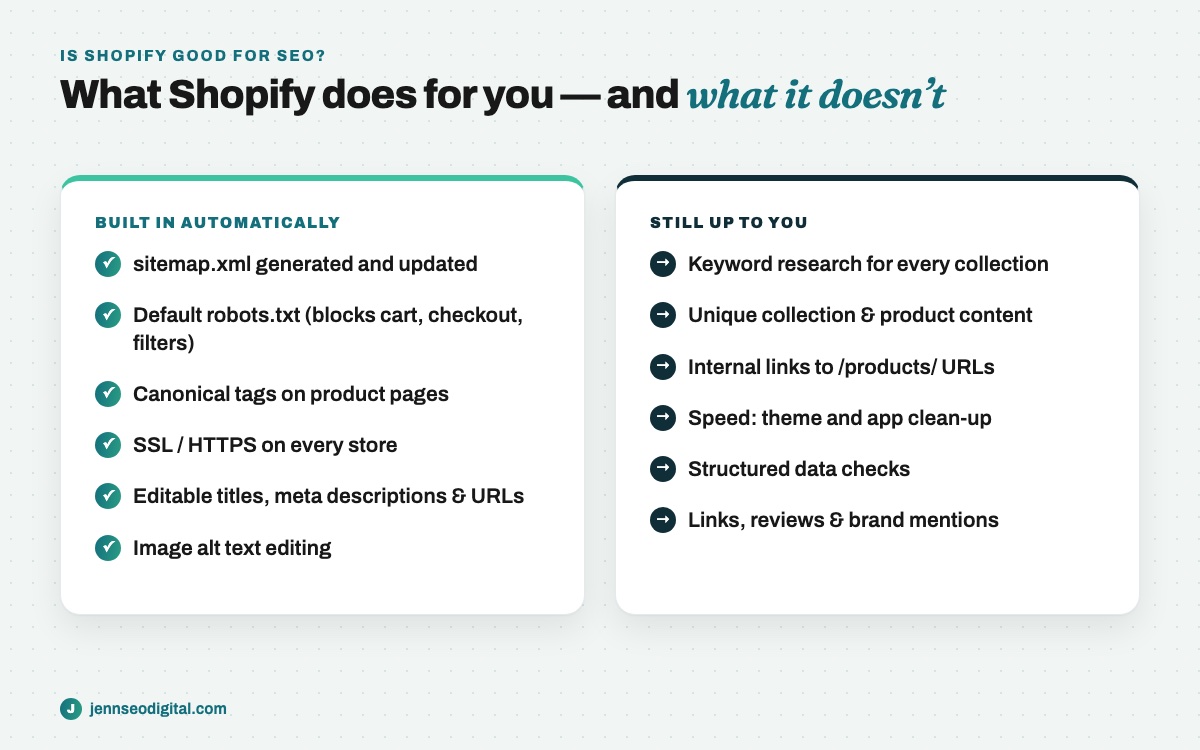
According to Shopify’s help center, all Shopify stores automatically generate a sitemap.xml file that links to your products, collections, pages and blog posts, and updates whenever you add new content. Every store also has a default robots.txt file that blocks cart, checkout, account and filtered collection URLs that would otherwise create duplicate content.
What Shopify does not do is decide which keywords each page should target, write helpful collection copy, build authority or keep your theme fast. Those are the levers that separate stores that rank from stores that simply exist.
The key point is that Shopify gives you a solid technical base. Your rankings depend on what you build on top of it — which is what Shopify SEO work focuses on.
Shopify SEO Checklist at a Glance
A complete Shopify SEO checklist covers six areas: setup and indexing, keyword research and site structure, collection page optimization, product page optimization, technical fixes for duplicates and speed, and content plus authority building. The table below summarizes each area and what to check.
| Area | What to check |
| Setup and indexing | Primary domain set, password page off, Search Console and Bing Webmaster Tools verified, sitemap.xml submitted |
| Keywords and structure | One primary keyword per collection and product, logical collection hierarchy, clear main navigation |
| Collection pages | Keyword-led title and H1, unique intro copy, helpful content below the grid, internal links to related collections |
| Product pages | Unique descriptions, descriptive titles, image alt text, reviews, Product structured data |
| Technical fixes | Internal links to /products/ URLs, no indexable duplicates, broken links fixed, unused apps removed, Core Web Vitals passing |
| Content and authority | Blog content answering buyer questions, links from relevant sites, brand mentions, AI search visibility |
The bottom line is to work through these areas in order. Content and links pay off far more when your structure and technical foundation are already right.
How Do You Set Up Shopify for SEO?
To set up Shopify for SEO, connect your primary domain and redirect other domains to it, remove the storefront password, verify the store in Google Search Console and Bing Webmaster Tools, submit your sitemap.xml file, and set your homepage title and meta description under Online Store > Preferences.
- Set your primary domain. Make sure every other domain you own redirects to it, so Google sees one version of your store.
- Turn off the password page. Search engines cannot crawl a password-protected store, and Shopify notes your sitemap cannot be read while the store is private.
- Verify Google Search Console. Add the verification meta tag to your theme.liquid file or use DNS verification, then submit sitemap.xml under Indexing > Sitemaps.
- Verify Bing Webmaster Tools. Bing powers several AI search experiences, so it is worth the five minutes.
- Write your homepage title and description. Shopify recommends titles of 60 characters or fewer and meta descriptions of around 160 characters.
- Connect Google Analytics 4. You need conversion data to know which pages actually bring sales.
The key point is that these steps take an afternoon but affect every page you publish afterwards. If you are unsure what else needs fixing, run through a full SEO audit checklist first.
How Do You Do Keyword Research for a Shopify Store?
To do keyword research for a Shopify store, list your product categories, find the search terms buyers use for each one with tools like Google Search Console, Ahrefs or Semrush, group similar terms into clusters, and assign one primary cluster to each collection or product page. Prioritize buyer-intent terms over broad, informational ones.
Ecommerce keywords usually fall into three groups:
- Category keywords such as “waterproof hiking boots” — target these with collection pages.
- Product keywords such as a brand and model name — target these with product pages.
- Question keywords such as “how to choose hiking boots” — target these with blog posts that link to your collections.
Many stores miss easy wins by never creating collections for the specific ways people shop: by use case, size, material, compatibility or occasion. On one automotive accessories store, mapping keywords across the full product range led to more than 360 optimized collection and landing pages, which became the core of its organic growth. Keyword research is where that scale starts.
The bottom line is that every collection you create should exist because people search for it, not just because it fits your internal catalogue.
How Do You Optimize Shopify Collection Pages for SEO?
To optimize a Shopify collection page, give it a keyword-led title tag and H1, write a short unique introduction above the products, add helpful content such as buying advice or FAQs below the product grid, use a clean URL handle, and link to related collections and guides. Collection pages often rank better than individual products for category searches.
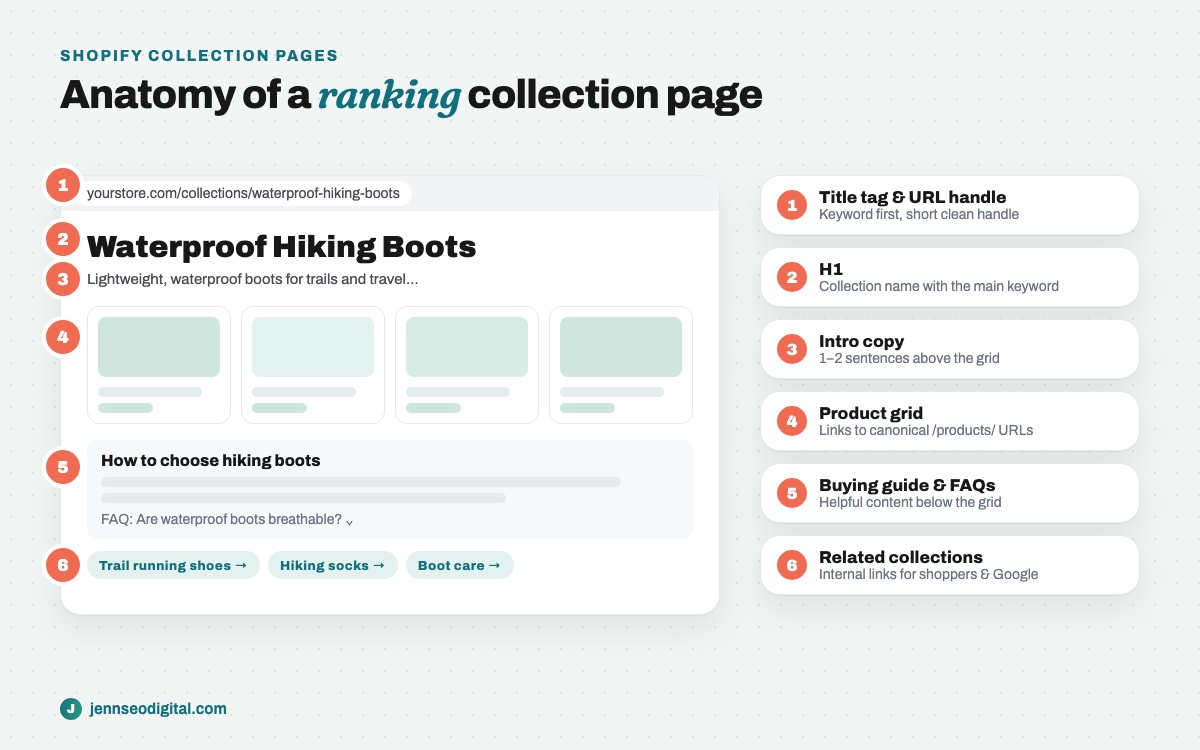
- Title tag: put the main keyword first, such as “Waterproof Hiking Boots for Women | Brand Name,” within about 60 characters.
- H1: use the collection name with the primary keyword; most Shopify themes use the collection title as the H1.
- Intro copy: one or two sentences above the grid that confirm what shoppers will find. Keep it short so products stay visible.
- Content below the grid: a short buying guide, sizing advice or FAQs that answer real questions. This is where most of your ranking content lives.
- URL handle: keep it short and descriptive, like /collections/waterproof-hiking-boots, and avoid changing it once it ranks.
- Internal links: link to sub-collections, related collections and blog guides so both shoppers and Google can move through your store.
- Meta description: write a benefit-led description around 150–160 characters to improve click-through rates.
Shopify does not support true nested collections, so build hierarchy through navigation menus, linked sub-collections and breadcrumbs instead. The key point is that a collection page should read like the best answer to a shopper’s category search, not just a grid of products.
How Do You Optimize Shopify Product Pages for SEO?
To optimize a Shopify product page, write a unique description instead of the manufacturer’s copy, use a descriptive product title with the key attributes, add alt text to every image, show reviews, keep the URL handle clean, and make sure your theme outputs Product structured data with price, availability and ratings.
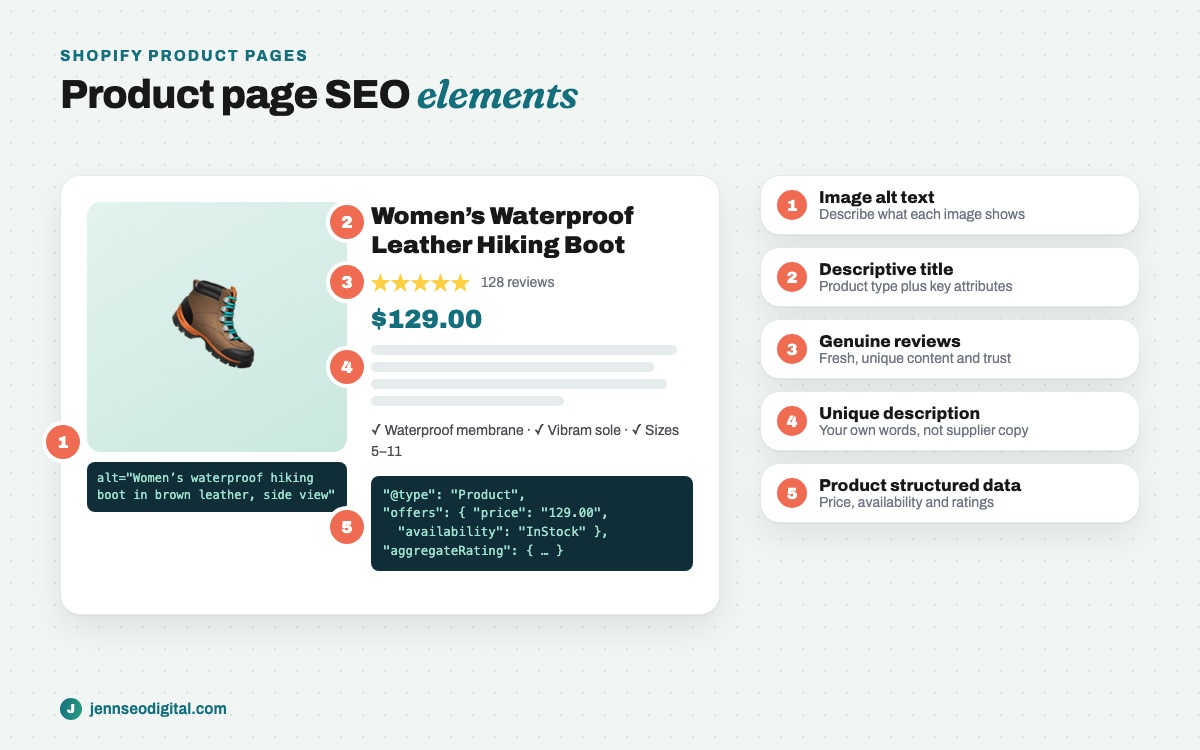
- Product title: include the product type and key attributes, such as material, size or compatibility, in natural language.
- Unique description: explain benefits, use cases and specifications in your own words. Duplicate supplier copy is one of the most common Shopify SEO problems.
- Image alt text: describe what each image shows. Shopify lets you edit alt text directly on each product image.
- Reviews: genuine customer reviews add fresh, unique content and build trust with shoppers and search engines.
- Structured data: most modern themes output Product schema; check it with Google’s Rich Results Test so price, availability and ratings can appear in search.
- Variants: keep colours and sizes as variants of one product rather than separate near-duplicate products, unless each variant has real search demand of its own.
The bottom line is that product pages win on detail and trust. The store with the most helpful, specific product information usually earns both the ranking and the sale. That is a core part of on-page SEO for ecommerce.
How Do You Fix Duplicate Content on Shopify?
To fix duplicate content on Shopify, make sure internal links point to the canonical /products/ URL instead of collection-based product URLs, keep filtered and sorted collection URLs out of the index, avoid creating separate products for simple variants, and write unique descriptions for similar products. Shopify’s canonical tags help, but clean internal linking matters most.
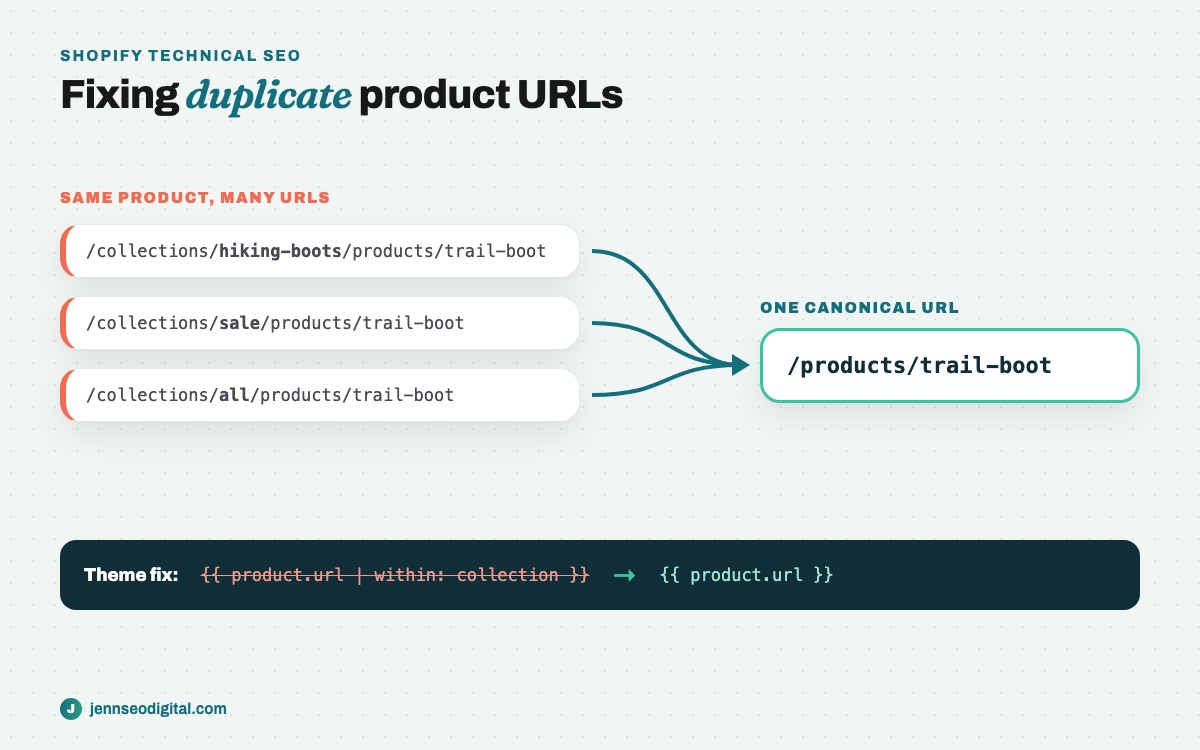
When a shopper clicks a product inside a collection, many themes link to a URL like /collections/hiking-boots/products/trail-boot instead of /products/trail-boot. Both URLs show the same page. Shopify adds a canonical tag pointing to the /products/ version, but linking to the duplicate path thousands of times still sends mixed signals and wastes crawl budget.
The common fix is a small theme edit: in the product card or product grid snippet, remove the within: collection filter from the product URL so links point straight to /products/. Test the change on a duplicate theme first, or ask a developer if you are not comfortable editing Liquid. Shopify’s default robots.txt already blocks filtered and sorted collection URLs, and its help center warns that incorrect edits to robots.txt.liquid can cause a loss of traffic, so change that file only with care.
The key point is that duplicate content on Shopify is rarely a penalty risk, but it dilutes your ranking signals. Cleaning it up is part of technical SEO for any growing store.
How Do You Improve Shopify Site Speed and Core Web Vitals?
To improve Shopify site speed, remove unused apps and their leftover code, use a lightweight theme, compress and correctly size images, limit sliders and autoplay videos, and check Core Web Vitals in Google Search Console. Faster pages improve rankings eligibility, user experience and conversion rates.
- Audit your apps: each app can add scripts to every page. Uninstall apps you do not use and check that their code was removed from your theme.
- Optimize images: upload images at the size they are displayed and let Shopify serve modern formats.
- Simplify the homepage: heavy sliders, pop-ups and videos above the fold slow down Largest Contentful Paint.
- Monitor Core Web Vitals: use the Core Web Vitals report in Search Console and PageSpeed Insights to find slow templates.
The bottom line is that speed problems on Shopify usually come from what has been added to the store, not from Shopify itself.
How Do You Get Your Shopify Store Found in AI Search?
To get your Shopify store found in AI search, make sure your collections and products are indexed, answer common buyer questions clearly on collection pages and in blog posts, keep product data accurate in structured data and Google Merchant Center, and build reviews and mentions on trusted sites so AI tools can recommend your brand.
Shoppers increasingly ask tools like ChatGPT and Google AI Mode for product recommendations and comparisons. Those answers are drawn from indexed pages, product feeds, reviews and brand mentions — the same signals strong ecommerce SEO already builds. If you want to understand how this differs from classic SEO, read SEO vs GEO vs AEO, and see how AI SEO fits into an ecommerce strategy.
The key point is that AI search rewards stores with clear, trustworthy, well-structured information about what they sell.
Working With a Shopify SEO Specialist
If you would rather have an expert work through this checklist with you, I’m Jenn, an ecommerce SEO specialist who has worked on Shopify, WooCommerce and custom stores for clients in the US, UK, Australia and Asia. Results include a new store that ranked 21,877 keywords and earned $150K+ in four months.
You can explore my Shopify SEO services, compare WooCommerce SEO if you are choosing a platform, or request a free SEO audit of your store. If you are deciding who to hire, my guide on how to hire an SEO expert in the Philippines covers costs, red flags and the questions to ask.
Frequently Asked Questions
How do you do SEO on Shopify?
To do SEO on Shopify, set your primary domain and verify Google Search Console, research keywords for each category, optimize collection and product titles, H1s, descriptions and alt text, fix duplicate product URLs in internal links, keep your theme fast, and publish helpful content that earns links and mentions from relevant websites.
Does Shopify include SEO?
Shopify includes basic SEO features but not a full SEO strategy. Every store gets an automatic sitemap.xml file, a default robots.txt file, canonical tags, SSL and editable titles, meta descriptions, URL handles and image alt text. Keyword research, content, internal linking, speed optimization and link building are still up to you.
Is Shopify more SEO friendly than WooCommerce?
Shopify is easier to keep SEO-friendly, while WooCommerce is more flexible. Shopify handles hosting, security and core technical SEO automatically but has fixed URL structures. WooCommerce gives full control over URLs and code but requires more maintenance for speed and plugins. Both can rank very well when set up properly.
Do Shopify tags help SEO?
Shopify product tags do not directly improve rankings. They are mainly used to organize products and power filters. Tag-filtered collection URLs are usually blocked by Shopify’s default robots.txt file, so they will not rank. To target a search term, create a dedicated collection page with its own title, description and content instead.
Does alt text help SEO on Shopify?
Yes, alt text helps SEO on Shopify. It tells search engines what an image shows, helps your products appear in Google Images and makes your store accessible to people using screen readers. Write short, specific descriptions of each image that naturally include the product name and key attributes, without stuffing keywords.
Which SEO app is best for Shopify?
There is no single best SEO app for Shopify, and many stores need none. Use apps only for specific gaps, such as bulk-editing meta tags, adding structured data your theme lacks or compressing images. Every app adds code that can slow your store, so choose a few well-reviewed tools and remove any you stop using.
Can you have a collection within a collection on Shopify?
Shopify does not support true nested collections, but you can create the same structure. Build separate sub-collections, link them from the parent collection page and your navigation menu, and use breadcrumbs. For SEO, give each sub-collection its own keyword focus, title, description and content so it can rank independently.